


👨💻 Welcome to the Engineering Skills for Data Scientists series, where I’ll be teaching the engineering skills that quietly separate data scientists who can ship from the ones who can’t. This is article 4 of 5. You can find the full series here.
Here’s a moment most data scientists hit eventually…
You’ve trained a model. It works. The metrics look good, the code runs end-to-end, the notebook tells a clean story.
And then someone else wants to use it.
The product team wants to classify new sign-ups in real time.
The marketing team wants a dashboard that shows the latest prediction every time someone clicks.
The backend engineer wants to call your model from their service.
Suddenly, “the model works” isn’t enough. It has to run, somewhere, that something else can talk to.
This is the gap most data scientists hit and aren’t quite sure how to cross.
The standard answer for closing this gap is FastAPI. It’s the tool that turns your model into a service: something that listens for requests, runs predictions, and sends answers back.
Before we get into how, it’s worth being clear about what kind of model-running this article is for. Not all model deployment looks the same, and FastAPI is the right answer for a specific case. We’ll start there.
Let’s get to it.
Here’s what we’ll cover
When you actually need to “serve” a model (and when you don’t)
Why FastAPI became the default for ML and data teams
Building your first FastAPI service, step by step
What changes when it goes to production
🎥 Try it on your own (a short walkthrough + Colab notebook)
How this shifts the way your team sees your work
When you actually need to “serve” a model
The term “model serving” gets thrown around a lot, but it means a very specific thing.

And before you reach for FastAPI (or any other tool), it’s worth carefully considering whether your use case actually calls for it.
There are two ways models typically run in production. They look similar from the outside but require completely different infrastructure.
1. Batch inference
Your model runs on a schedule (say, every night at 2am), processes a batch of new data, and writes the predictions to a table. Downstream systems read from that table whenever they need them.
Some common use cases in real data science work:
A churn model that runs nightly, scores every active customer, and writes the results to a
customer_risktable for the CRM team to useA demand forecast that runs weekly, generates predictions for every SKU, and dumps them into a planning dashboard
A propensity model that runs daily, scores leads, and updates a Salesforce field
💡 The infrastructure here is simple: a cron job (or Airflow, Prefect, etc.) triggers your script, your script writes to a database, and you’re done. You don’t need FastAPI for this. You don’t need an API at all. You just need scheduled execution and a place to write results.
2. Real-time inference
Something needs a prediction right now, in response to a specific request, and is waiting for the answer before it can move on.
Examples:
A new user signs up, and your fraud model needs to score them before the account is created
A user types a search query, and your ranking model needs to reorder results before the page loads
An app sends an image to your classifier and expects a label back within a few hundred milliseconds
The infrastructure here is different. Something has to be listening. Something has to accept the request, run the model, and send a response back, fast. A cron job can’t do that. A scheduled script can’t do that. You need a service.
A service exposes one or more endpoints: specific URLs that other code can call to get something done. Your model would live behind an endpoint like /predict, and anything that needs a prediction sends a request to that URL.
That’s where FastAPI comes in.
💡 If your model’s output can be computed ahead of time and stored, you probably need batch inference, not FastAPI. If something is waiting for a prediction in real time, you need to serve it.
Why FastAPI
Once you’ve established that you actually need real-time serving, the next question is which tool.
There are several options, but FastAPI has quickly become the default for ML and data teams, and there are real reasons for that.

What FastAPI gives you
A few things that matter specifically for data science work:
Type hints become enforced contracts. The same Python type hints you’d write anyway (
age: int,name: str) become the spec for your endpoint. FastAPI wires them into Pydantic, which validates every incoming request at runtime. Bad input gets rejected before it reaches your model, with no extra work from you. (This is the same Pydantic from article 1, just doing its job at the endpoint.)Async support is built in. If your model is doing anything I/O-bound (calling another API, querying a database, hitting an LLM provider), async means your service can handle many requests at once without blocking.
Automatic API documentation. FastAPI generates interactive docs at
/docsfor free. Backend engineers and product teams can click through your endpoints and try them out without you writing a thing.
How it compares to the alternatives
Flask is the old standard. Lighter, more minimal, no async by default, no Pydantic, no automatic docs. Still a fine choice for small, synchronous services, but you’ll end up writing the validation and documentation FastAPI gives you for free.
BentoML is purpose-built for ML serving. It handles model packaging, versioning, and batching out of the box. Worth considering when you’re running multiple models at scale, but it’s more opinionated and has a steeper learning curve.
Streamlit (or Gradio) is for interactive demos and dashboards, not for serving models to other services. If a human is clicking buttons, Streamlit is great. If another piece of software is calling your model, you want FastAPI.
In short: FastAPI hits the sweet spot for most data scientists. It’s fast enough for production, opinionated enough to keep you out of trouble, and uses the Python features (type hints, Pydantic) you should be using anyway.
Building your first FastAPI service
Let’s build the smallest useful thing: a service that loads a model and exposes a single endpoint that returns predictions.
Step 1: Install what you need
pip install fastapi uvicornTwo packages:
fastapiis the framework itselfuvicornis the server that actually runs it.
Step 2: Define the request and response shapes
Before writing any endpoint logic, define what the service accepts and returns. Pydantic does this.
from pydantic import BaseModel

class PredictionRequest(BaseModel):
    age: int
    income: float
    tenure_months: int

class PredictionResponse(BaseModel):
    churn_probability: float
    risk_band: str
That’s the contract. The request must have three numeric fields.
The response will always have a probability and a risk band. If anything tries to send a request that doesn’t match, FastAPI rejects it with a clear error before your model ever sees it.
Step 3: Build the endpoint
from fastapi import FastAPI
import joblib

app = FastAPI()

# Load the trained model once, when the service starts
model = joblib.load("churn_model.pkl")

@app.post("/predict", response_model=PredictionResponse)
def predict(request: PredictionRequest):
    features = [[request.age, request.income, request.tenure_months]]
    probability = float(model.predict_proba(features)[0][1])

    if probability >= 0.7:
        risk_band = "high"
    elif probability >= 0.4:
        risk_band = "medium"
    else:
        risk_band = "low"

    return PredictionResponse(
        churn_probability=probability,
        risk_band=risk_band
    )
A few things worth noticing:
The model loads once, when the service starts. Not on every request. Reloading the model per request would be slow and pointless.
The endpoint takes a
PredictionRequestdirectly as a parameter. FastAPI handles the JSON parsing and Pydantic validation automatically.The return type is declared (
response_model=PredictionResponse), which means FastAPI also validates the output before sending it back.
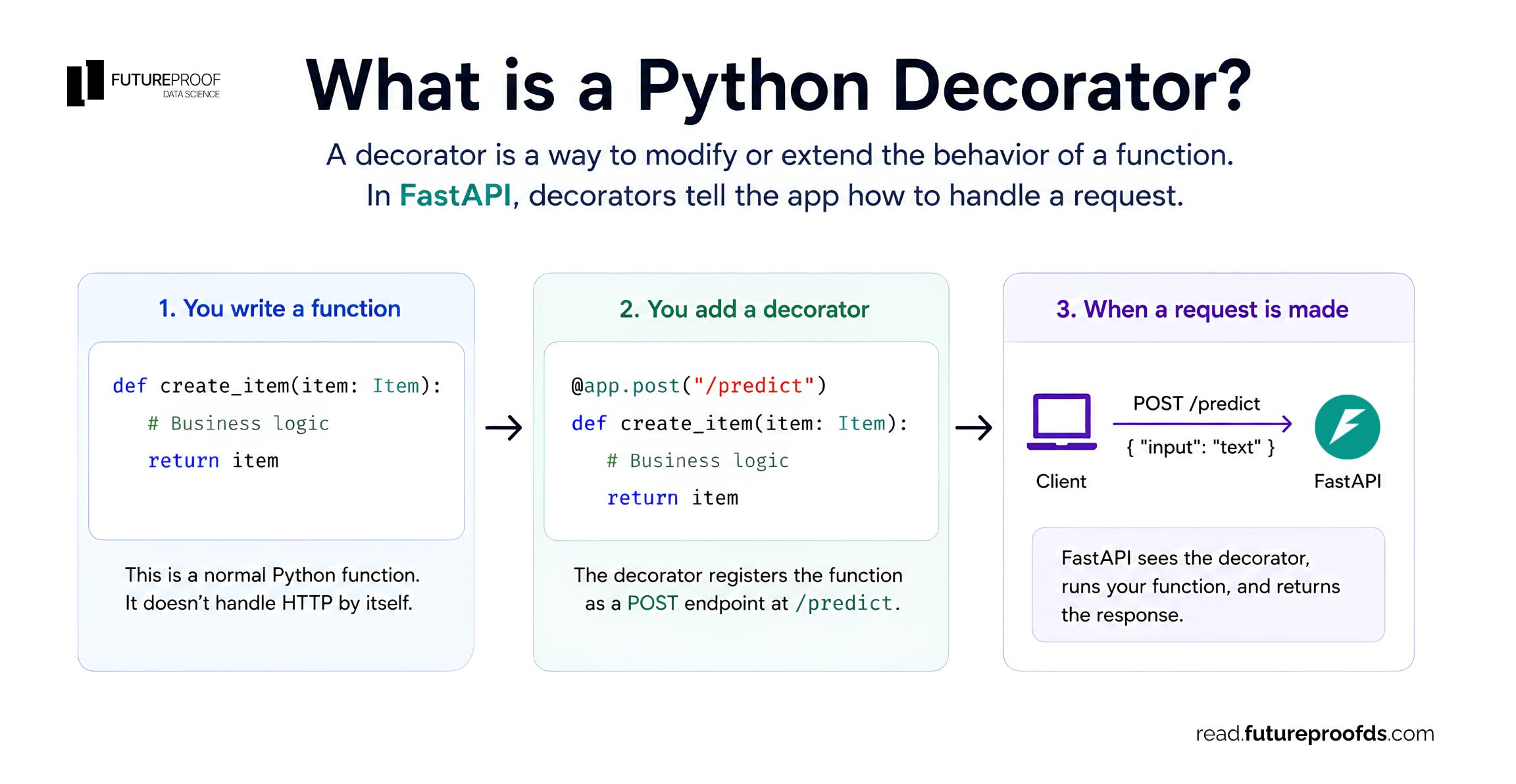
By the way, if you’ve never used Python decorators before (e.g., @app.post), this diagram should help you get an intuition for how they work:
Step 4: Run it locally
uvicorn main:app --reloadThis starts the service on http://localhost:8000. The --reload flag means it automatically picks up changes while you’re developing.
To check that it works, open http://localhost:8000/docs in your browser. FastAPI generates an interactive UI where you can fill in the request fields and test the endpoint directly. No Postman, no curl, no extra tools.
Step 5: Test it from code
import requests

response = requests.post(
    "http://localhost:8000/predict",
    json={"age": 35, "income": 75000.0, "tenure_months": 24}
)

print(response.json())
# {'churn_probability': 0.23, 'risk_band': 'low'}
That’s the loop. Send JSON, get a prediction back. Anyone on your team (or any other service) can now call this model the same way.
💡 The validation you got “for free” from Pydantic isn’t a small thing. Try sending
{"age": "thirty-five"}to the endpoint. FastAPI rejects it with a clear error pointing at exactly which field was wrong, and your model never gets called with bad data.
What changes when this goes to production
Everything above runs fine on your laptop. Putting it in front of real users requires a few additional things that data scientists often skip and later regret.
Logging at the endpoint
The skills from article 2 apply directly here. Every endpoint should log the inputs it received, the predictions it returned, and any errors that occurred. When something goes wrong in production (and it will), these logs are how you debug.
import logging
logger = logging.getLogger(__name__)

@app.post("/predict", response_model=PredictionResponse)
def predict(request: PredictionRequest):
    logger.info(f"Prediction request: age={request.age}, tenure={request.tenure_months}")
    try:
        features = [[request.age, request.income, request.tenure_months]]
        probability = float(model.predict_proba(features)[0][1])
        # ... rest of the logic
        logger.info(f"Prediction returned: probability={probability:.3f}")
        return PredictionResponse(...)
    except Exception as e:
        logger.exception("Prediction failed")
        raise
Don’t log raw payloads if they contain anything sensitive (user PII, financial data). Log the metadata you’d need to debug, not the data itself.
Error handling
By default, if your endpoint raises an exception, FastAPI returns a 500 Internal Server Error with no useful information. That’s bad. The client doesn’t know what went wrong, and you’ve leaked the fact that something crashed without giving any signal about what.
A simple pattern: catch known failure modes and return clear HTTP responses.
from fastapi import HTTPException

@app.post("/predict", response_model=PredictionResponse)
def predict(request: PredictionRequest):
    if request.tenure_months < 0:
        raise HTTPException(status_code=400, detail="Tenure cannot be negative")
    # ... rest of the endpoint
This returns a 400 Bad Request with a clear message, which is what a well-behaved API does.
Health checks
Every production service needs an endpoint that says “I’m alive and working.” Without this, infrastructure tools can’t tell whether to keep your service running or restart it.
@app.get("/health")
def health_check():
    return {"status": "ok"}
Three lines. It’s the smallest, highest-leverage thing you can add to a production service.
What comes next?
A FastAPI service running on your laptop is not a deployed service. Getting from one to the other involves a few more steps: packaging your service in a container (Docker), running it somewhere that’s always on (a cloud platform like Render, Fly.io, or AWS), and making sure it can handle traffic (autoscaling, load balancing).
Those are real topics, and they’re worth their own articles.
Try it on your own
Reading about FastAPI gets you halfway there. The other half is actually running a service, calling it, and watching it respond.
I put together a small companion repo. You’ll train a tiny churn model, wrap it in a FastAPI service, call it for a real prediction, and add one endpoint yourself.
About 10-20 minutes end-to-end, and the repo uses uv from the previous article, so the setup is a single command.
Final thoughts
Once you can wrap a model in FastAPI, the conversation about your work changes.
You stop being the person who “has a model in a notebook” and become the person who “ships services other teams can call.” That’s a meaningful shift, both in how you think about your work and how the rest of your organization treats you.
The mechanics, as you’ve seen, are not that hard. Five steps to a working service. A bit more for production-readiness.
The hard part isn’t the framework, it’s getting in the habit of thinking about your model as a service that something else depends on, rather than as a one-off artifact that produces a number when you ask.
💡 If you’re earlier in your career: don’t worry about deployment, scaling, or any of the downstream concerns yet. Just get one model running behind a
/predictendpoint on your laptop. Use the interactive docs at/docsto play with it. That one exercise teaches you more than reading a dozen tutorials.
A couple of other great resources:
🎥 Want to follow along on YouTube? I just launched a channel for data scientists. Don’t forget to subscribe to not miss any videos.
🤝 Want to connect? Find me on LinkedIn, where I share more on data science careers and the AI shift.
Thank you for reading! And stay tuned for next week’s article in the Engineering Skills for Data Scientists series.
- Andres Vourakis
Before you go, please hit the like ❤️ button at the bottom of this email to help support me. It truly makes a difference!
I'm a big fan of FastAPI, and appreciate you helping tease out the ideal cases for it (and when not to use it). Just a note that we no longer need `uvicorn` to run FastAPI, just use `fastapi run main.py` with all the usual options. Still not the most robust service for running in production, but works for many cases.
Thanks for the article and all your work.