

👨💻 Welcome to the Engineering Skills for Data Scientists series, where I’ll be teaching the engineering skills that quietly separate data scientists who can ship from the ones who can’t. This is article 3 of 5. You can find the full series here.
You’ve probably been through this more times than you’d like to admit…
You train a model, hand it to a colleague, and they get different results on the same data. Not wildly different. Just different enough to make both of you uncertain about which numbers to trust.
You spend the next hour comparing package versions, scikit-learn changelogs, and Python environments. Eventually, you find it: a minor scikit-learn release between your install and theirs changed how missing values are handled.
Same code. Same data. Different numbers.
And this challenge is only becoming more common in data science. As the role continues to evolve and we build more systems, deploy more models, and use more external libraries, we will see more situations like this:
A RAG system in production silently drifts because a LangChain minor release changed retrieval behavior.
An AI workflow breaks six months later because the OpenAI SDK had a breaking change.
An ML model you want to deploy can’t be reproduced cleanly because half the packages have moved on.
In every case, the issue isn’t your code. It’s how Python environments and dependencies are being managed, which for most data science work is “barely at all.”
In this article, we’ll fix that using uv.
Let’s get to it!
Here’s what we’ll cover
Why your environment keeps breaking (and what’s actually going wrong)
Why uv beats what you’re probably using today
Your first reproducible project, in under 5 minutes (includes 🎥 walkthrough)
Moving your existing projects over without breaking them
Why this skill quietly raises the bar of every project you ship
Why “it works on my machine” keeps happening
Most data scientists don’t think much about how Python environments work. You install Anaconda, you pip install whatever a tutorial tells you to, and you move on.

That’s fine until it isn’t.
Here’s the mess most data scientists end up with over time:
System Python, Anaconda, and maybe pyenv all installed, each with their own packages, each invoked by different shell commands. You’re never quite sure which
pythonyou’re running.pip installwithout a virtual environment, which means every project you’ve ever worked on shares the same set of packages. Upgrading something for one project quietly breaks another.A
requirements.txtthat lists the top-level packages (pandas,scikit-learn) but not the specific versions, and not the dozens of transitive dependencies that those packages bring in. Different machines end up installing different versions of NumPy, and your reproducibility is gone.No record of which Python version the project needs. The script runs on 3.10, it breaks subtly on 3.12, and nobody documented which one you developed against.
The result is that every new project, and every old project you come back to, becomes a small investigative mission. What version of Python is this? Which environment am I supposed to activate? Why does this import fail?
You can absolutely keep working this way; most data scientists do.
But every hour you spend debugging environments is an hour not spent on actual work, and every handoff is one more opportunity for something to break silently.
Why uv (and why now)
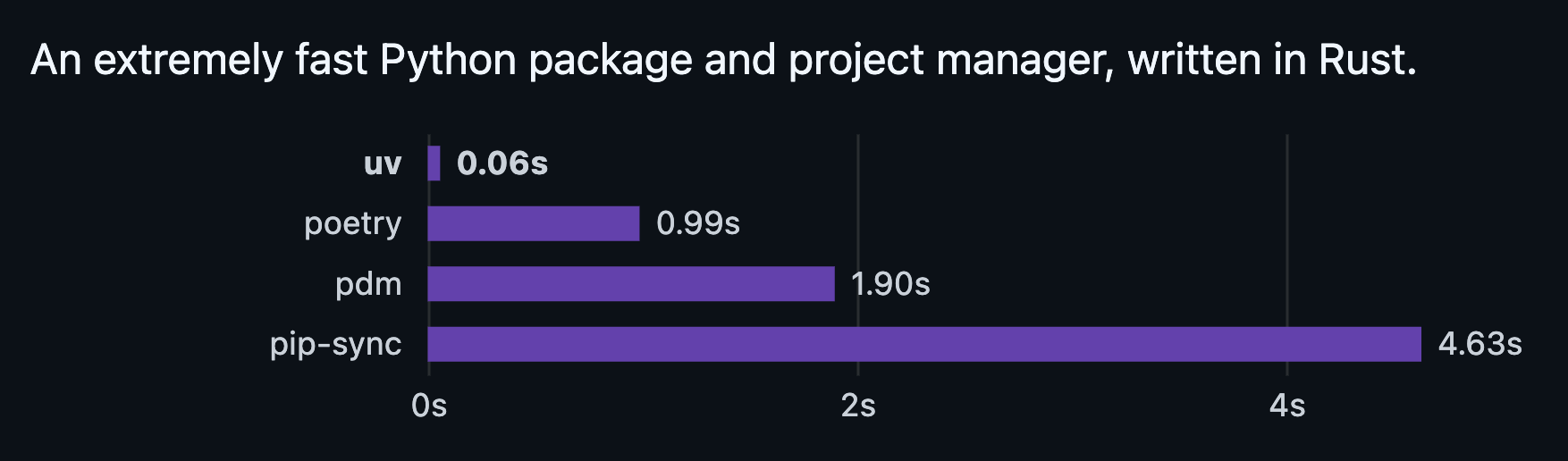
uv is a Python package and project manager built by Astral, the team behind ruff. It’s been gaining serious traction over the past year. Anthropic uses it in their SDK examples, FastAPI’s docs reference it, and many open-source data science projects have moved to it.
A few things make it stand out:
It’s fast. Genuinely fast. Installing dependencies that take pip a minute often take uv a few seconds.
It does everything in one tool. Virtual environments, dependency installation, dependency resolution, lockfiles, Python version management. You stop juggling separate tools for separate jobs.
It’s compatible with the existing ecosystem. It reads
requirements.txt, generatespyproject.toml, works with PyPI, and doesn’t require you to throw out your existing workflow on day one.
The cleaner way to think about it: uv is what pip + venv + pyenv + poetry would have been if they’d been designed together from the start, instead of evolving separately over a decade.
How uv compares to what you’re probably using now
A short, honest comparison:
pip + venv: still works, and there’s nothing wrong with it as a foundation. But you’re managing too many small things by hand: creating environments, activating them, tracking versions, generating lockfiles. uv automates all of this.
Anaconda / conda: the data science default for years, and it does solve dependency management. But it’s heavy, slow on resolution, and increasingly out of sync with the broader Python ecosystem. Most teams I talk to are quietly migrating away.
Poetry: the closest competitor to uv, and a real tool worth knowing about. The main difference is speed (uv is significantly faster) and adoption velocity (uv is being picked up faster across the data ecosystem right now).
Nothing here is to say your current setup is wrong. If pip + venv works for you, it works. The argument for switching is that uv removes friction you’ve been quietly absorbing for years.
Setting up your first project with uv
Let’s walk through what using uv actually looks like. The goal is a small, reproducible project that anyone can clone and run with one command.
Step 1: Install uv
On macOS or Linux:
curl -LsSf https://astral.sh/uv/install.sh | shOn Windows:
powershell -ExecutionPolicy ByPass -c "irm https://astral.sh/uv/install.ps1 | iex"That’s it. uv is a single binary with no Python dependencies, so the install is fast and doesn’t interfere with your existing setup.
Step 2: Initialize a new project
uv init my-analysis
cd my-analysis
This creates a new project folder with a few starter files. The two that matter:
pyproject.toml: the project’s declared dependencies, Python version, and metadata.python-version: which Python version this project uses
Step 3: Pin a Python version
uv python pin 3.12This tells uv (and anyone who clones your project) that this code is meant to run on Python 3.12. If they don’t have 3.12 installed, uv will install it automatically the first time they sync the project.
That last part is genuinely a big deal. You no longer have to ask people to install the right Python version manually. uv handles it.
Step 4: Add dependencies
uv add pandas scikit-learnA few things happen when you run this:
uv finds the latest compatible versions of
pandasandscikit-learnIt resolves all the transitive dependencies (NumPy, scipy, joblib, etc.)
It writes the top-level packages to
pyproject.tomlIt writes the exact resolved versions of everything to a lockfile called
uv.lockIt creates a virtual environment (
.venv) and installs everything into it
That uv.lock file is the key to reproducibility. Anyone who clones your project and runs uv sync will get the exact same versions of every package, all the way down.
Step 5: Run code in your project
uv run python my_script.pyuv run executes a command inside your project’s environment. You don’t need to manually activate a virtual environment first (although you can, if you prefer).
You can also start a Jupyter notebook or any other tool the same way:
uv run jupyter labThe end state
After these five steps, your project is fully reproducible. Anyone who clones it and runs:
uv sync…gets an identical working environment in under a minute. Same Python version, same package versions, same transitive dependencies. No more “it works on my machine.”
💡 The mental shift: with uv, your project is its environment. The Python version, the dependencies, and the lockfile travel with the code. There’s no separate setup ritual to remember six months later.
Migrating an existing project
Most data scientists won’t be starting from scratch. You probably have projects with a requirements.txt, a conda environment, or both. The good news: uv handles migration cleanly.
If you have a requirements.txt
From inside your existing project folder:
uv init
uv add -r requirements.txt
uv reads your existing requirements.txt, resolves it, and creates the same pyproject.toml + uv.lock setup as a fresh project. Your old environment can be deleted once you’ve confirmed everything works.
If you have a conda environment
This is where it gets slightly more nuanced.
If your project uses packages that only exist on conda (rare for pure Python, more common if you’re working with niche scientific libraries), you may want to keep conda around for those specific cases.
For most data science work, though, the packages you care about (pandas, scikit-learn, PyTorch, transformers, etc.) are all on PyPI and install cleanly with uv. The transition is straightforward: list out the packages your conda environment uses, then uv add them in a new uv-managed project.
You don’t have to migrate everything at once. Start with a new project, get comfortable with uv, and migrate older projects when you’re working on them anyway.
Final thoughts
Most data scientists don’t take dependency management seriously, which is exactly why doing it well sets you apart.
A portfolio with a clean
pyproject.tomland a lockfile tells anyone reviewing your work that you know what you're doing.Colleagues notice when your projects just run on their machine.
Interviewers notice when you can talk about reproducibility without hand-waving.
On top of that, the day-to-day payoff is quite meaningful.
Every project you spin up is faster. Every handoff is smoother. Every six-month-old project still runs when you come back to it. Your stakeholders stop seeing the lag between “I’d like to look at this” and “here’s the analysis,” because the friction has been engineered out.
A couple of other great resources:
🎥 Want to follow along on YouTube? I just launched a channel for data scientists. Keep upskilling!
🤝 Want to connect? Find me on LinkedIn, where I share more on data science careers and the AI shift.
Thank you for reading! And stay tuned for next week’s article in the Engineering Skills for Data Scientists series.
- Andres Vourakis
Before you go, please hit the like ❤️ button at the bottom of this email to help support me. It truly makes a difference!
i love uv Always use it for any of my project