

Sadly, you know this story too well…
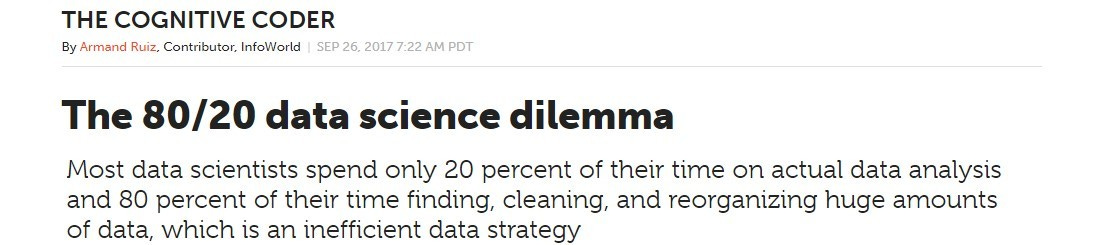
Data Scientists spend a disproportionate amount of time cleaning data rather than analysing it and extracting insights
Fortunately for us, this is one area where AI can actually be extremely useful in helping automate and provide huge productivity gains.
Which is why it was one of the first things I set out to build earlier this year as I began my journey with AI workflows and agents. I built an agent to handle the repetitive grunt work of fixing data types, removing outliers, handling missing values, etc, so I could focus more time on the analysis that matters.
Today, I will show you how to build a lightweight version of this system using LangGraph, so you can start bringing automation into your own analysis workflow.
But before that, let me show you the agent in action:
Now, let’s get to the implementation…
The data cleaning workflow
Before we get to the code, let’s visualise our workflow at a high level using LangSmith Studio.
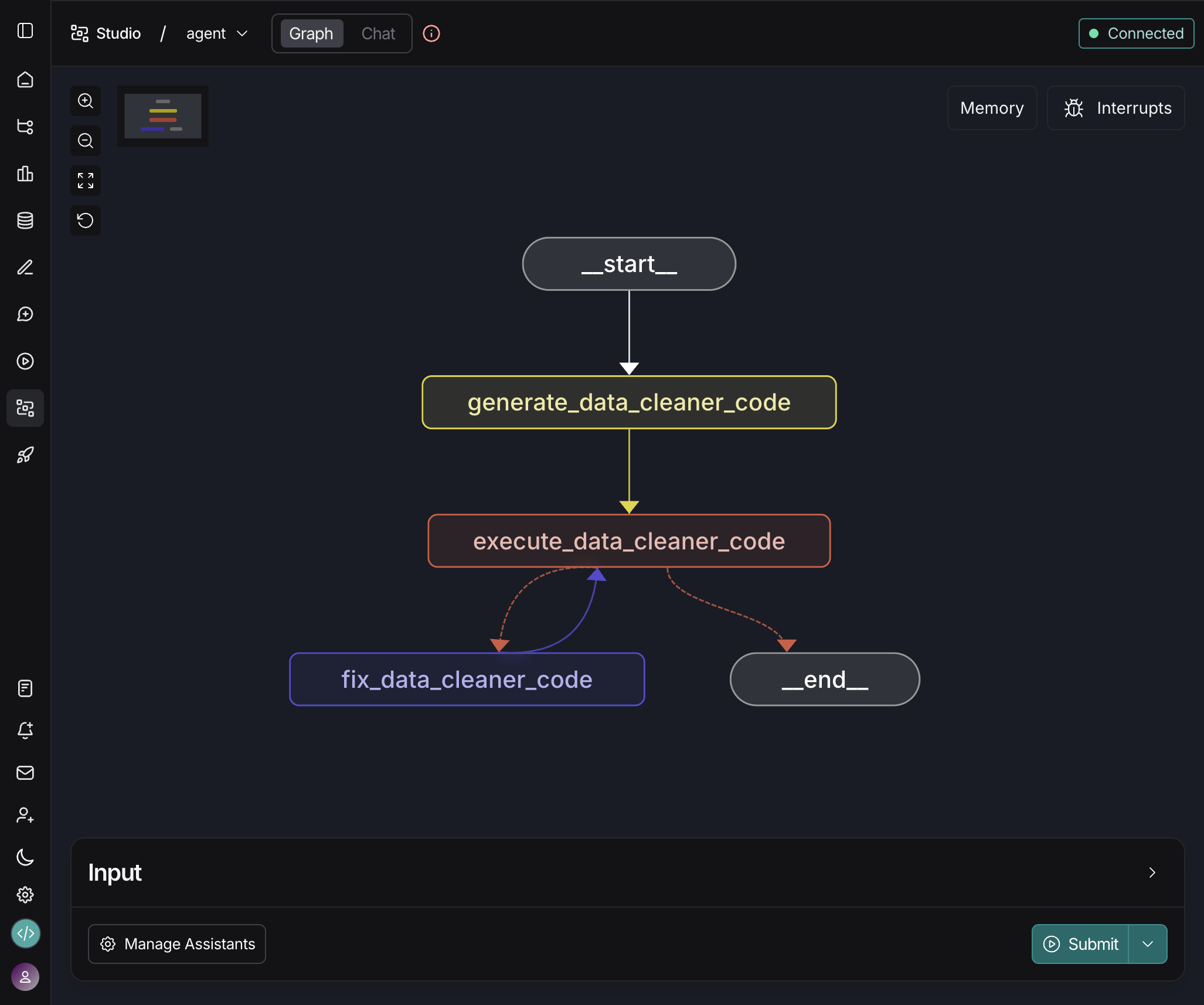
As you can see, the graph itself is actually very simple. It only contains 3 functional nodes and a single conditional edge. Here is an overview of what each one of these nodes handles:
create_data_cleaner_code: Call an LLM and instruct it to generate data cleaning Python code based on a series of requirements and a preview of our dataset.
execute_data_cleaner_code: Safely executing the Python code generated by the previous node.
fix_data_cleaner_code: Provide automatic error correction using an LLM feedback loop.
💡 This is the minimum functional version of our workflow. It performs well as a baseline, but it is only the starting point. You can extend it with additional elements like a human-in-the-loop stage or a more advanced planning node.
Alright, let’s see how the core logic works 👇
LLM-powered code generation node
For our purposes, this is the “reasoning“ node, the component that decides the most appropriate way to clean the data. Behind the scenes, it calls an LLM to generate Python code based on instructions and dataset characteristics.
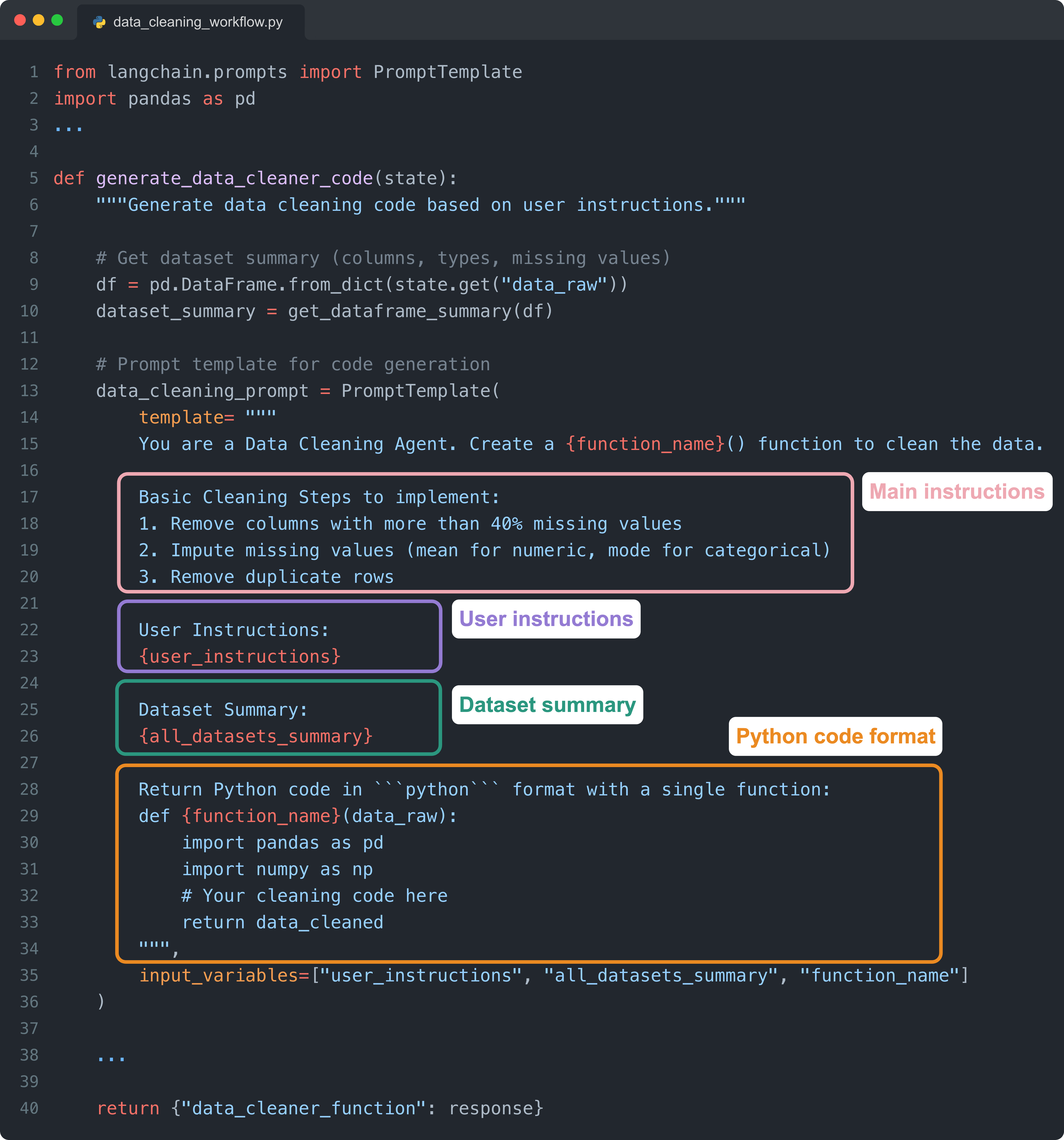
The prompt is handled using the PromptTemplate method by LangChain, which is great for defining a prompt with placeholders and filling them before sending it to an LLM. Here are the main parts of the prompt:
Main instructions: Define the cleaning policies the model should follow, describing how to handle common issues such as missing values or duplicates when they appear in the dataset.
User instructions: Free-form directions provided by the user that allow the agent to customize the cleaning logic based on specific needs or preferences.
Dataset summary: A structured overview of the dataframe, including column names, data types, and missing-value counts, which helps the model generate context-aware code.
Python code format: A template that forces the model to return valid, executable Python wrapped inside a single function so the workflow can run reliably end-to-end.
Now, let’s see what happens once we generate code!
Want to learn how to build this and similar AI workflows?
Most data scientists know how to prompt AI tools. Very few know how to turn AI into real workflows that 10x their analysis, amplify their impact, and future-proof their career.
This bootcamp is designed with you in mind.

For example, during week 3, you not only get a proper introduction to LangGraph, but also learn how to build a Data Cleaning agent and deploy it using Docker.
Every week, you build a project, and during the last week, you build a talk-to-your-data Slackbot that even your stakeholders can use immediately.
📌 Enrollment for the upcoming cohort is now open. Save your spot before it fills up: futureproofds.com (Use coupon code JAN26–25-ANDRES for 25% off)
Executing LLM-generated code
Once we get the data cleaning Python code from the LLM, we need to execute it in an isolated namespace and catch any errors so that we can utilize the retry logic.
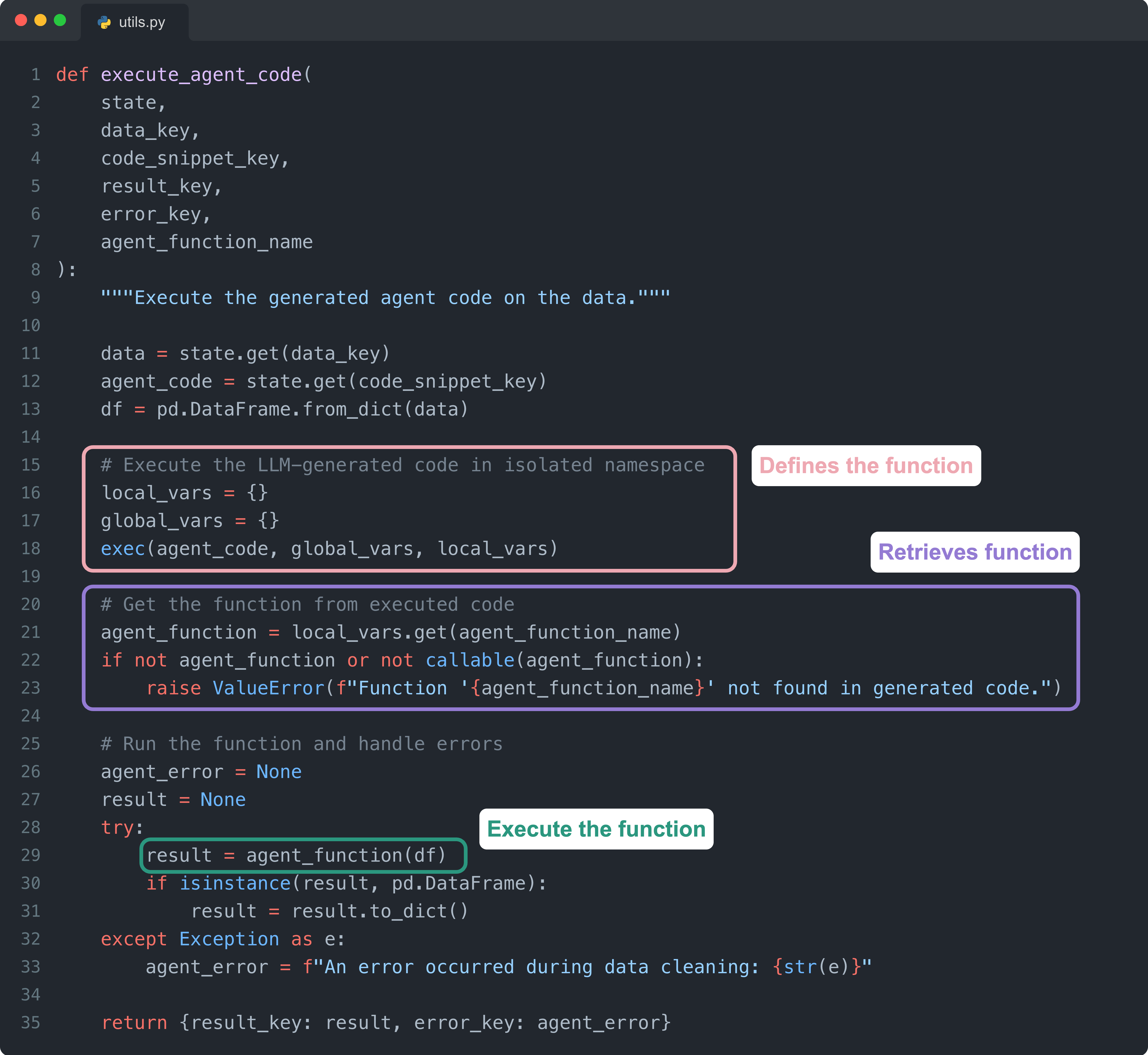
Here are the key parts of this code:
Defines the function: We use the built-in Python function
exec()to parse the LLM-generated code string and create the function definition in an isolated namespace.Retrieves function: Using
local_vars.get(), we extract the newly defined function object from the namespace so it can be called.Executes the function:
agent_function(df)runs the generated cleaning function on the actual data, returning either a cleaned dataframe or raising an error.
Let’s see what happens if the function call raises an error…
Self-correcting with error feedback
If the generated code fails, the agent automatically feeds the error message back into the LLM. This allows the model to diagnose the failure and produce a corrected version of the function without manual intervention.
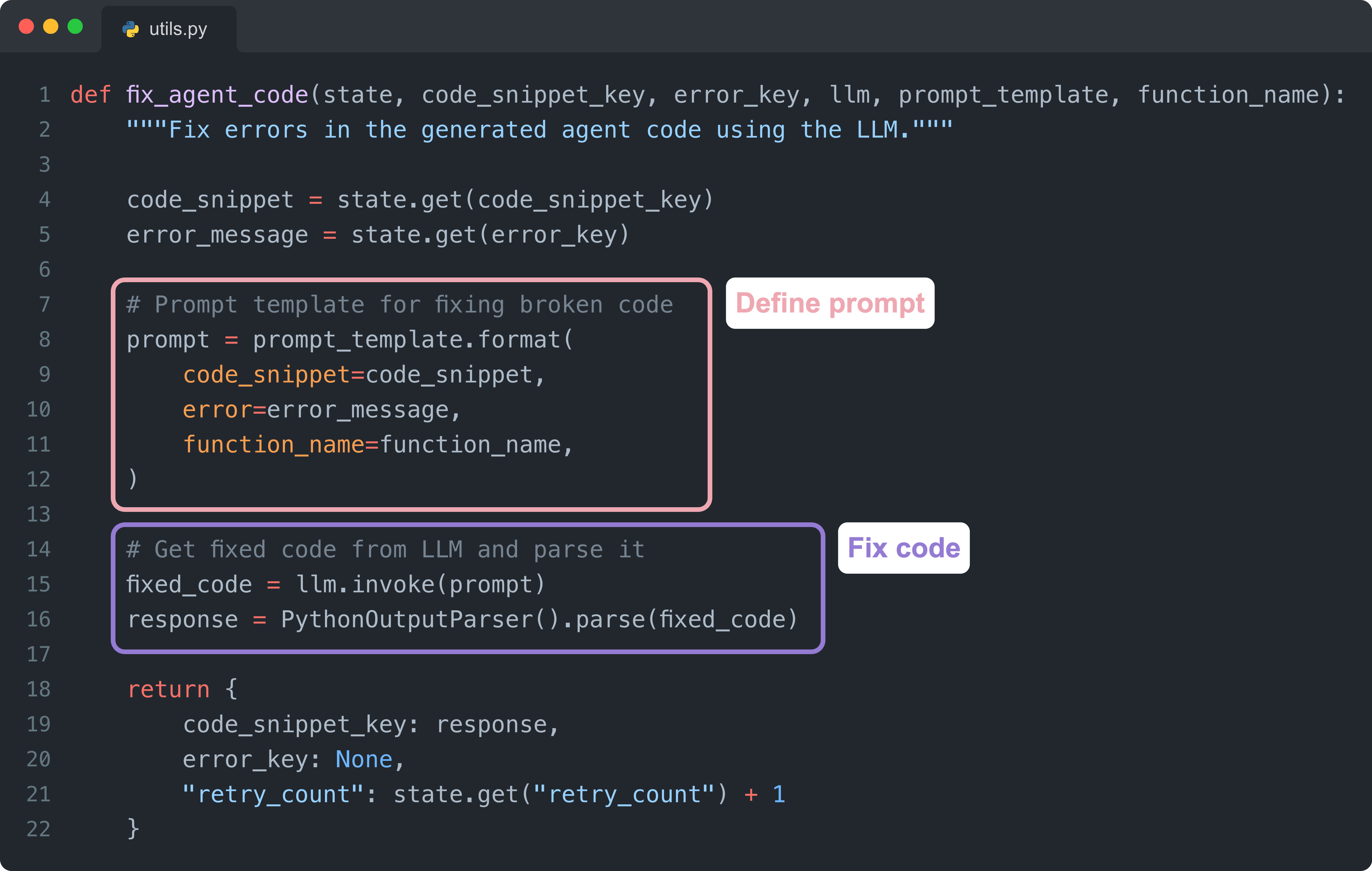
Define prompt:
prompt_template.format()creates the prompt by inserting the broken code and error message into a template that instructs the LLM to fix the issue.Fix code:
llm.invoke()sends the prompt to the LLM to generate corrected code, which is then parsed to extract clean Python from the response.
This feedback loop gives the agent the ability to iteratively recover from common errors and continue improving the generated code.
Usage example
Here is a simple example showing how to run the agent programmatically.
This pattern works well if you want to integrate the workflow directly into your existing codebase or automate it as part of a larger pipeline.
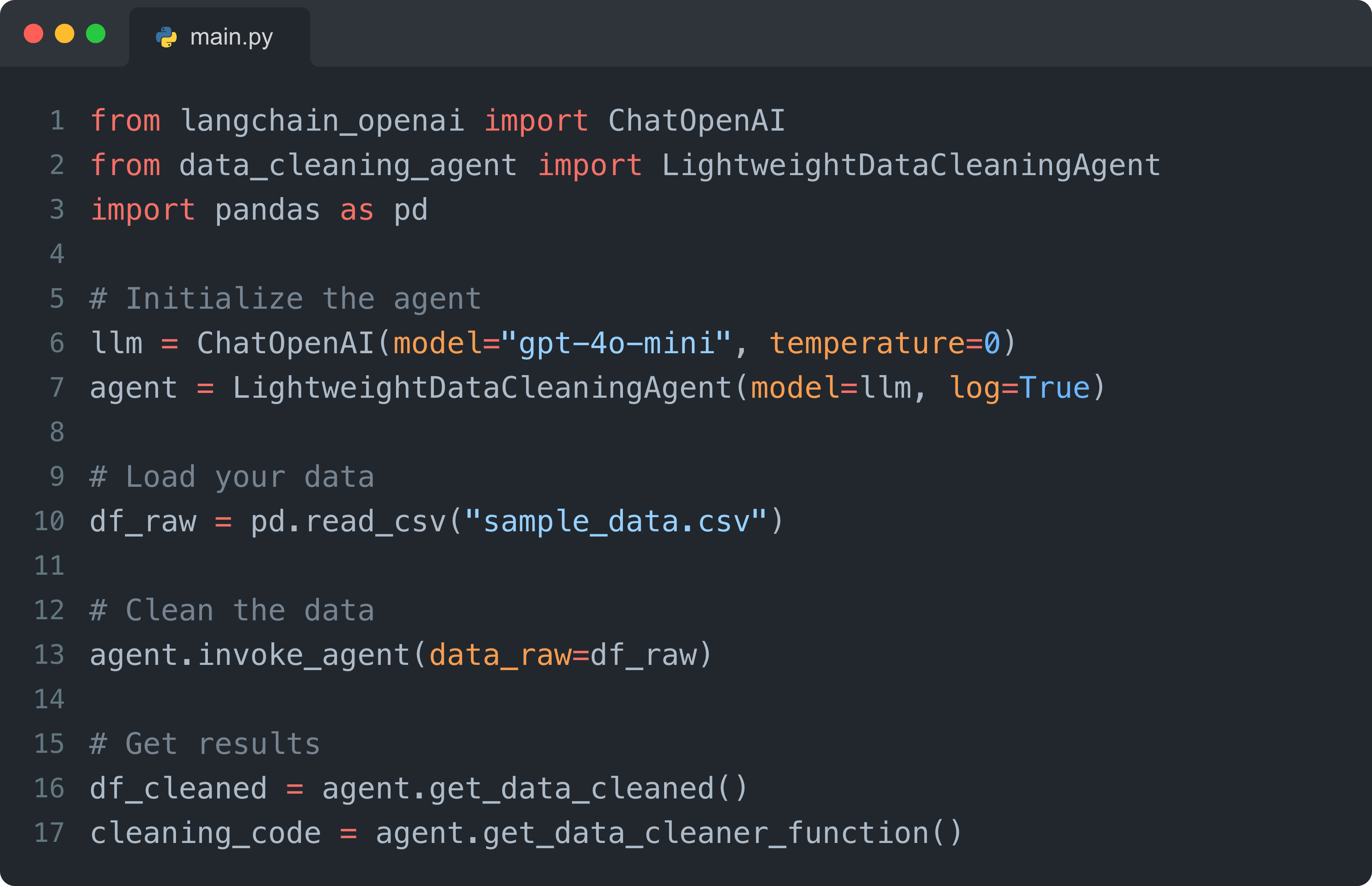
You can also build an interface on top of this, for example, using Streamlit as in the earlier demo. But the best approach depends on how you plan to use the agent.
For example, if your goal is to call it during EDA or iterative analysis, you can package the agent as a module and import it directly into a notebook. This allows you to generate cleaning functions, inspect them, and reuse them across different datasets without leaving your analysis environment.
If you want to play around with the code, here is the GitHub repo.
Final thoughts
What this agent demonstrates is not just a faster way to clean data, but a glimpse of a different way of working. We are moving from writing every transformation by hand to designing systems that generate, fix, and execute the code for us.
And when even a lightweight agent can remove hours of friction, it becomes clear how much of our time can be reclaimed for the parts of the job that actually require judgment, analysis, and creativity.
This is just the beginning, though. We can leverage AI for much more than just cleaning messy data!
A couple of other great resources:
🚀 Ready to take the next step? Build real AI workflows and sharpen the skills that keep data scientists ahead.
💼 Job searching? Applio helps your resume stand out and land more interviews.
🤖 Struggling to keep up with AI/ML? Neural Pulse is a 5-minute, human-curated newsletter delivering the best in AI, ML, and data science.
Thank you for reading! I hope you found this guide valuable in showing how AI can be leveraged in one of the most time-consuming parts of our workflows.
- Andres Vourakis
Before you go, please hit the like ❤️ button at the bottom of this email to help support me. It truly makes a difference!
One thing though - I guess this is about cleaning a static local pandas data frame. A more interesting and practical problem is cleaning in sql - when the source data in db is unclean and you want to clean it the same way in every iteration.
Amazing! Have you tried something like this in prod? I wonder how It can be enriched with GitHub MCP or even Jira ticket creation for bug reporting for example