

If you been reading my articles for a while, then you’ll know that I’ve been focusing deeply on Agentic Analytics for close to the past two years.
And that I recently move into consulting, so that I could help companies make the transition from traditional analytics into agentic analytics (the right way).
Naturally, I spend a lot of time self-learning and looking around to see how other data teams are handling these challenges.
So today I want to share some of the gems I’ve found along the way.
8 case studies from companies that are running AI agents for analytics in production today, covering what they built, the stack behind it, and the one lesson I think is worth stealing from each.
At the end, I share what they all have in common, my honest take on what it means for us data scientists building these systems in producition, and a NotebookLM with every case study loaded so you can dive deeper.
Alright, let’s get to it!
1. Vercel: The text-to-SQL agent that got better with fewer tools (built in-house)
Vercel's internal agent, d0, answers data questions in Slack, and the team made it better by replacing 17 specialized tools with an agent that simply reads the files where their metrics are defined and then runs SQL. On their benchmark of 5 representative queries, the simpler version succeeded on all 5 (up from 4) and was 3.5x faster while using 37% fewer tokens.
Stack: Claude Opus 4.5, Vercel AI SDK, Vercel Sandbox, Cube (semantic layer), Slack
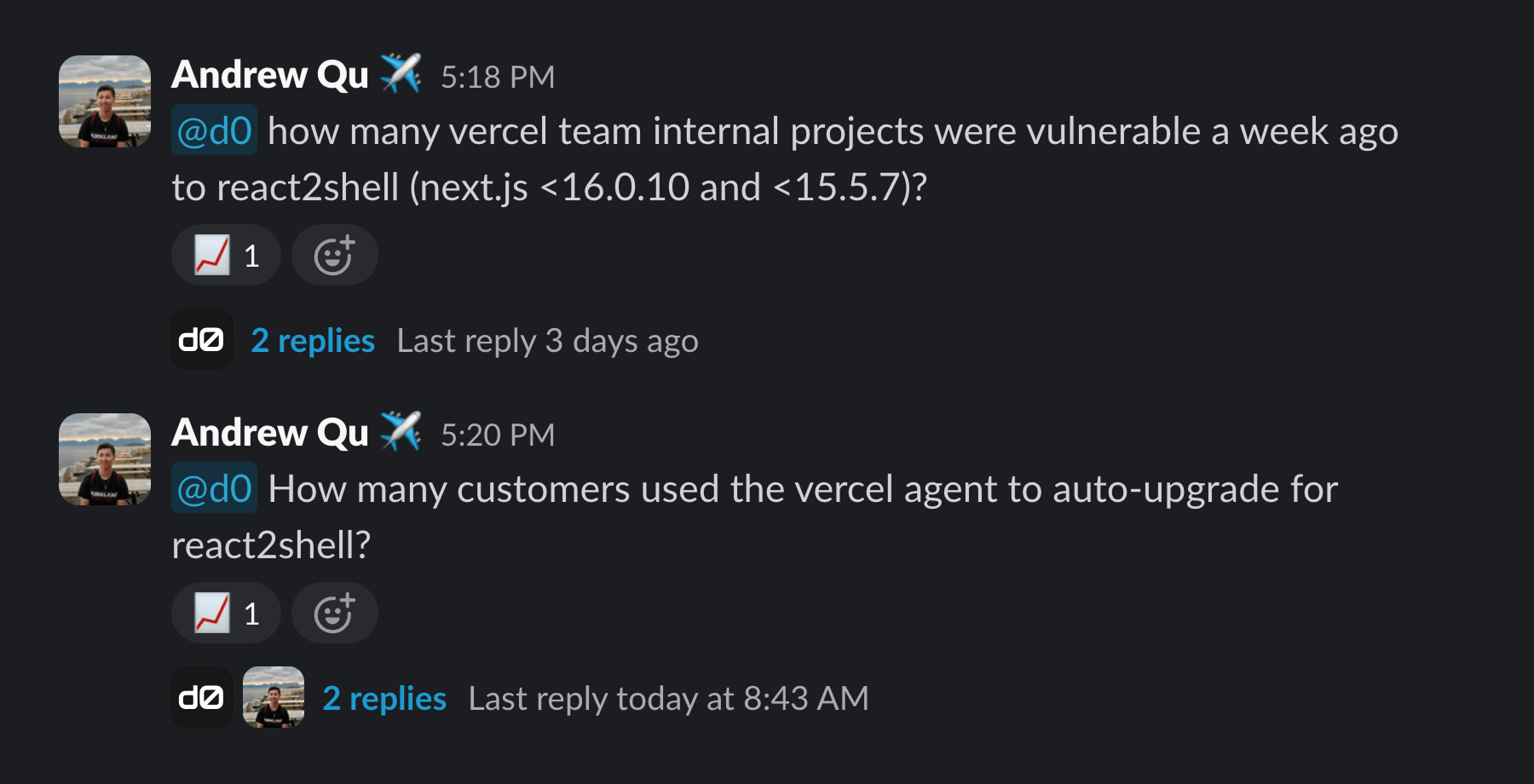
Lessons: Start simple, and only add complexity when you can prove you need it. Vercel's agent got faster and more accurate once they removed most of its custom tools and just let it read the files where their metrics are defined. But this only works if those definitions are clean and well documented, otherwise "you'll just get faster bad queries."
2. Anthropic: Self-service analytics with Claude (built in-house)
Anthropic employees can ask business questions and get answers from Claude through shared skills, with the same answer guaranteed whether they ask in Slack, the IDE, or a dashboard tool. They report that 95% of their business analytics queries are now automated at about 95% accuracy, which frees the data science team for causal modeling, forecasting, and machine learning.
Stack: Claude, semantic layer, skills (markdown files), MCP, Slack
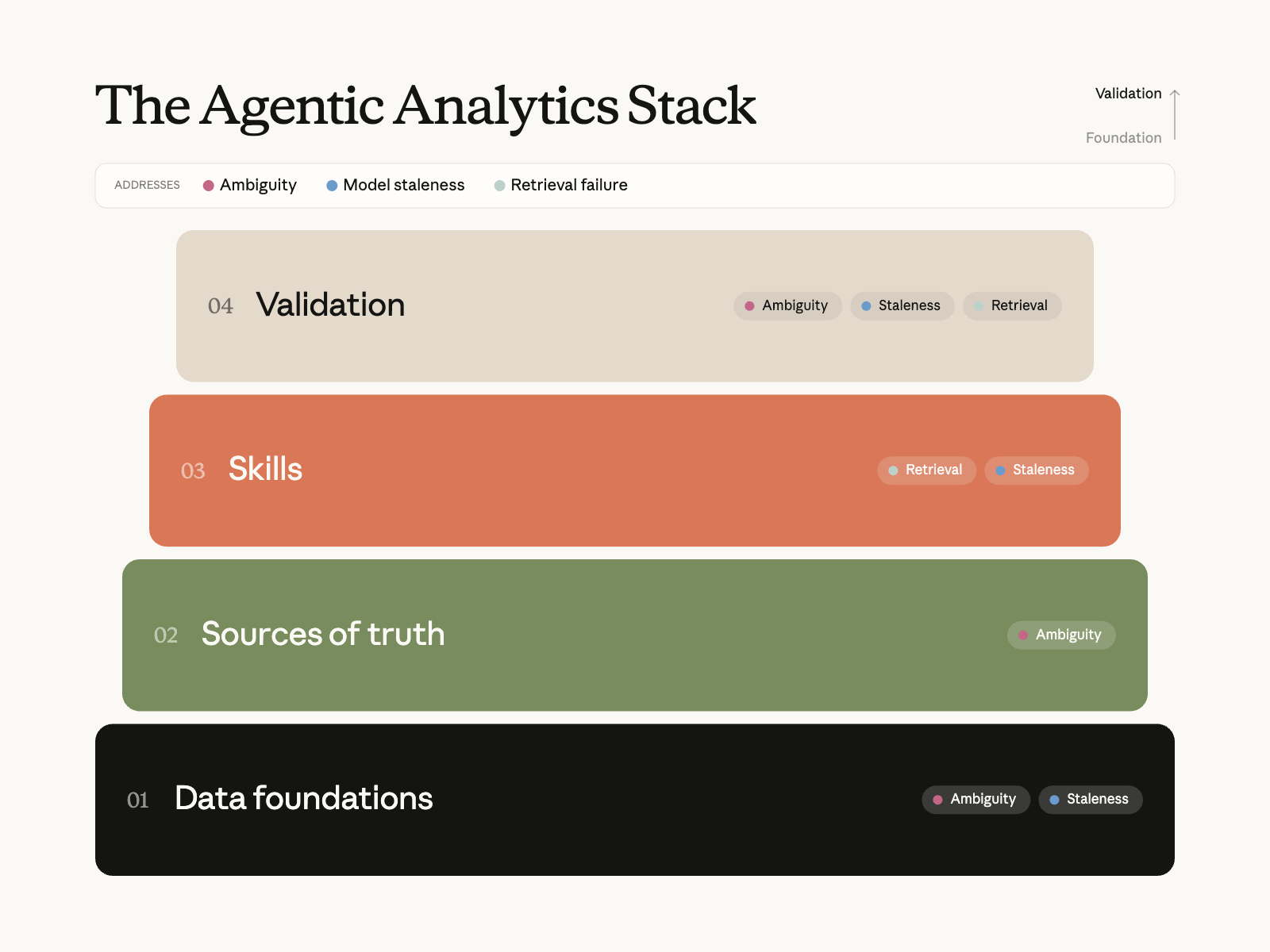
Lesson worth stealing: Treat your documentation like code. The agent is only as good as the docs it reads about your data, and when those went stale, Anthropic’s accuracy dropped from about 95% to about 65% in a single month. Now the docs live in the same repo as the data models, and any change to a model without a matching docs update gets flagged in review.
3. Pinterest: An analytics agent built on top of analyst query history (built in-house)
Pinterest's Analytics Agent helps analysts find the right table among more than 100,000, reuse existing queries, and generate validated SQL. Two months after launch it already covers 40% of their analysts and has 10x the usage of the next most popular agent at the company, although Pinterest admits that SQL generation still has room to improve.
Stack: PinCat (built on DataHub), AWS OpenSearch, Hive, Airflow, Presto, MCP
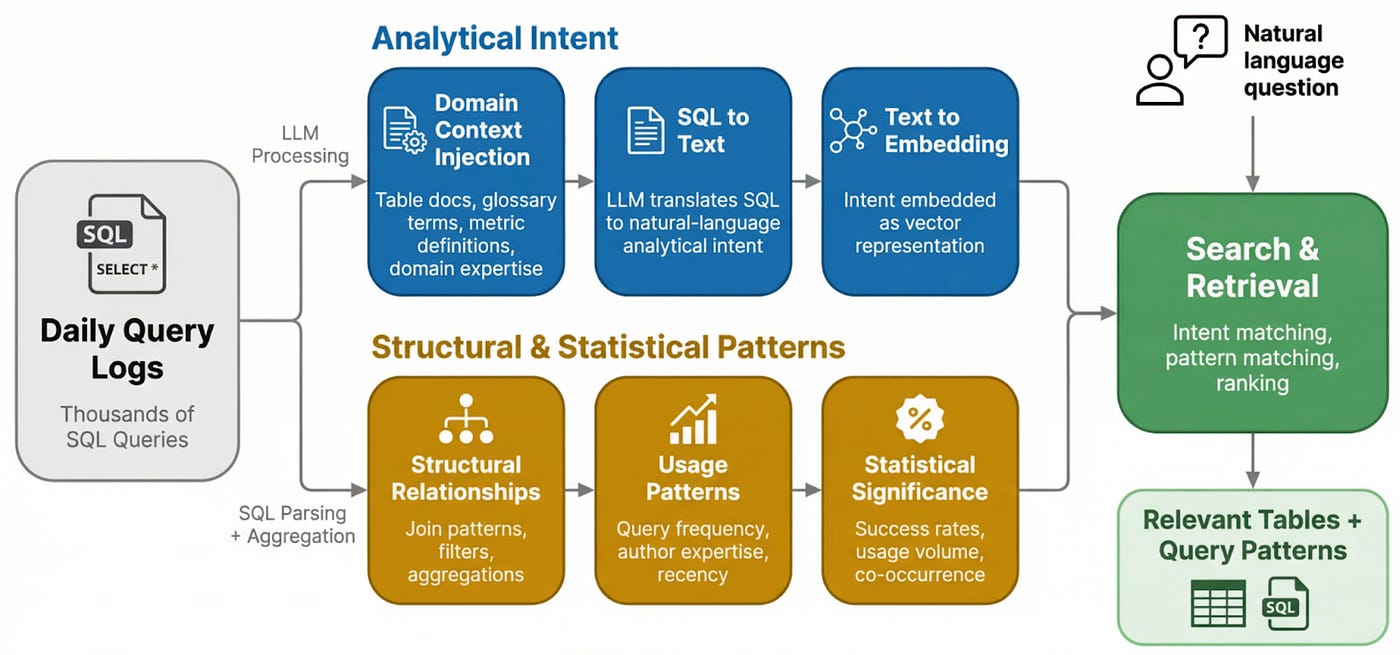
Lesson: Your analysts already wrote the perfect prompt. Every SQL query your team has written is the answer to a real business question, so Pinterest has an LLM describe that question in plain language for each past query and lets the agent search through them. The more queries analysts write, the better the agent gets.
4. Ramp: An AI analyst that lives in Slack (built in-house)
Ramp Research is an AI analyst built to remove the bottleneck of every data question waiting behind one on-call analyst. Since launching in August 2025 it has answered over 1,800 questions from 300 different users, and Ramp reports that people now ask 10 to 20 times more questions than before.
Stack: Snowflake, dbt, Looker, Slack
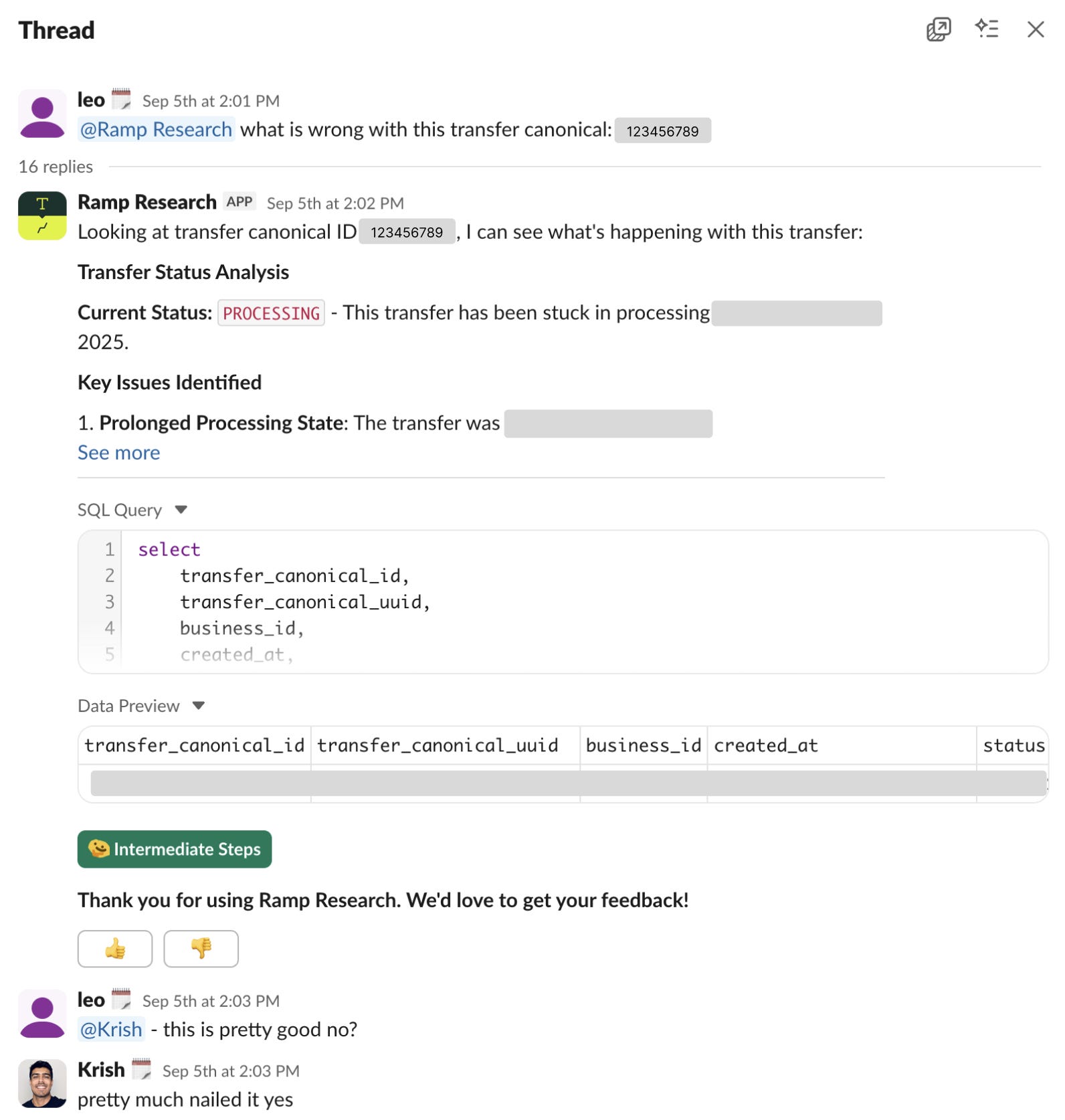
Main lesson: Test the steps, not just the answer. When you only check whether the agent's final number is right, a failure tells you something broke but not what. Ramp also checks which tables the agent picked and what the query looked like, so they know exactly what to fix.
5. OpenAI: A data agent with six layers of context (built in-house)
OpenAI built an internal data agent that takes employees from question to insight in minutes, across Slack, a web interface, IDEs, and their internal ChatGPT app. It sits on a data platform with more than 600 petabytes across 70k datasets, and to keep answers accurate it draws on six sources of context, including how each table is used, notes from domain experts, and corrections saved from earlier conversations.
Stack: GPT-5.2, Codex, Evals API, Embeddings API, MCP, Airflow, Spark, Slack
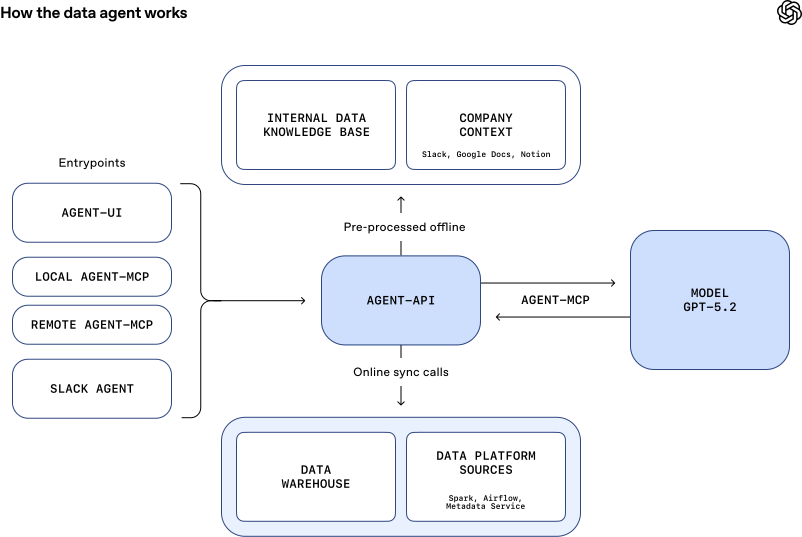
Lesson worth stealing: Let the agent read the code that builds your tables. A table's schema and past queries only tell you its columns and how people use it, but the code that creates the table shows the assumptions behind it, how fresh it is, and what the business meant it for.
6. Checkr: AI analytics built on defined metrics and business context (built on Omni)
Checkr connected an LLM directly to their warehouse and got a different, incorrect answer to the same question every time. They fixed it by adding two layers on top of Snowflake, one that defines their metrics and one that teaches the AI their business language, and now an operations leader can ask which queues pushed an SLA below 90% and get the answer in minutes instead of hours.
Stack: Snowflake, Omni (semantic layer and AI context), Claude, MCP
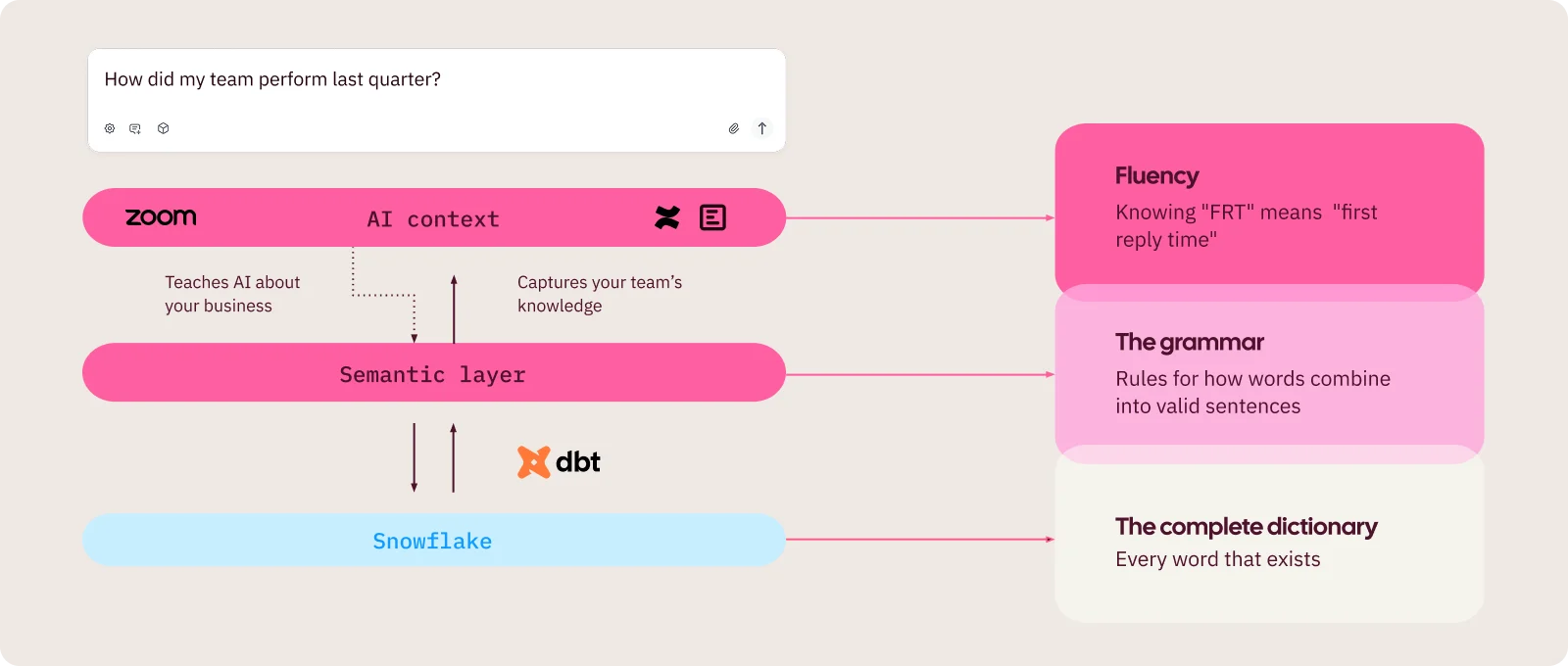
Main lesson from Chekr: The context you need already exists. The business knowledge an agent is missing (what a metric means, how a team talks about it) is usually already sitting in Zoom transcripts, Confluence pages, and Slack threads. Checkr uses an LLM to turn that material into short notes the agent can read, and a human edits every draft.
7. Cribl: Self-serve AI analytics built on well-documented data models (built on Omni)
Cribl ran into a problem most data teams share, which is that AI can't answer questions well about tables nobody has documented. They used an LLM to write documentation for about 150 dbt models at a cost of about $20, and today around 20% of their users rely on AI for analytics every month.
Stack: Snowflake, dbt, Omni, OpenAI API, GitHub
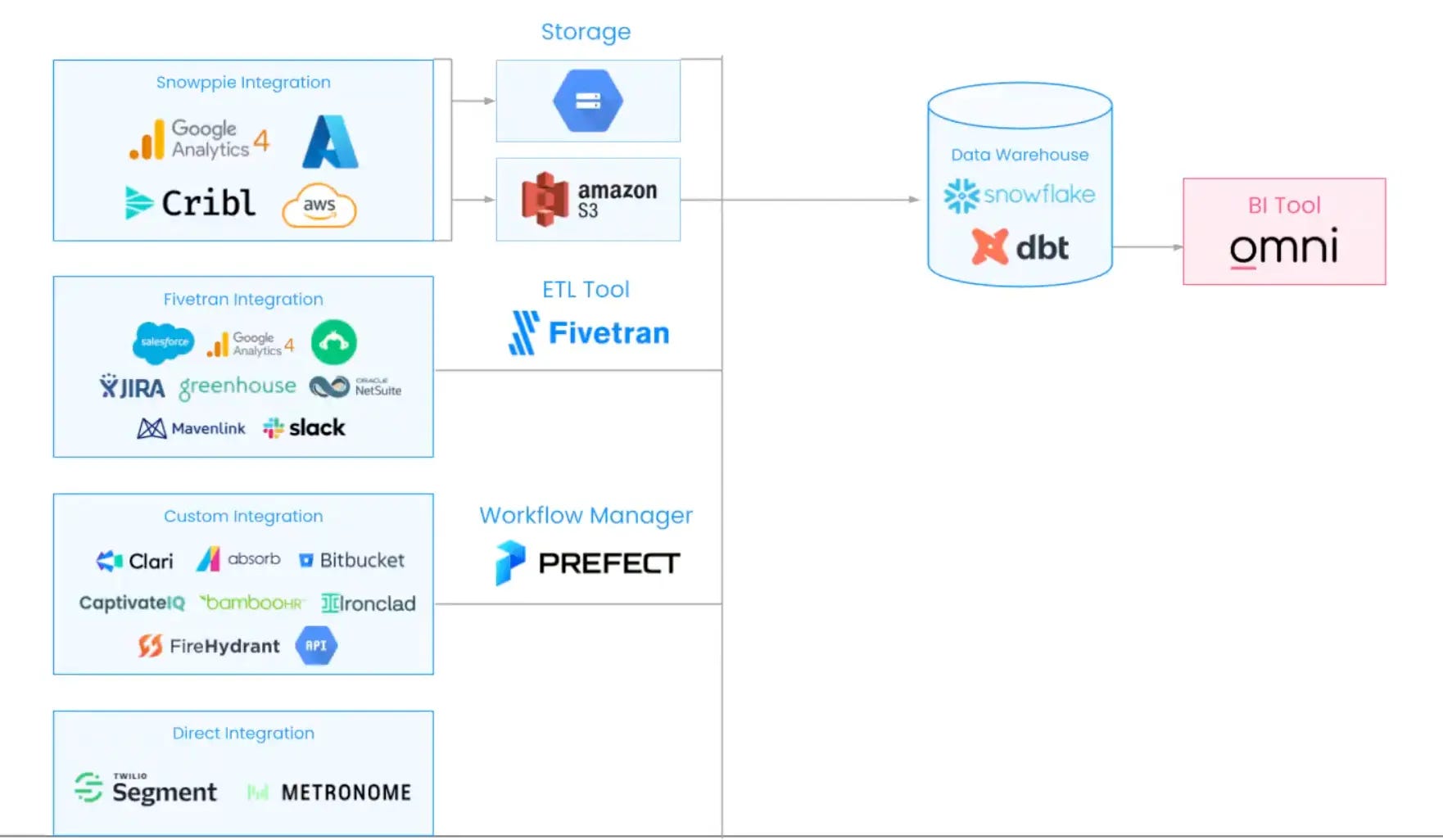
Main lesson: Automate documentation as part of your pipeline. An agent can't use a table it knows nothing about, and nobody enjoys writing docs by hand. So at Cribl, an LLM writes a description for every new data model the moment it's committed, and a human reviews it.
8. LangChain: An agent-first data stack run by a team of three (built on Hex)
LangChain's data team moved the whole company off a traditional BI tool in six weeks, and onto a setup where people ask an AI agent for the data they need. Their self-serve data agent now handles roughly 40x the request volume the three-person team could manage directly, with about 2,200 conversations in the last 30 days.
Stack: Hex, dbt, semantic model, GitHub, MCP, Slack
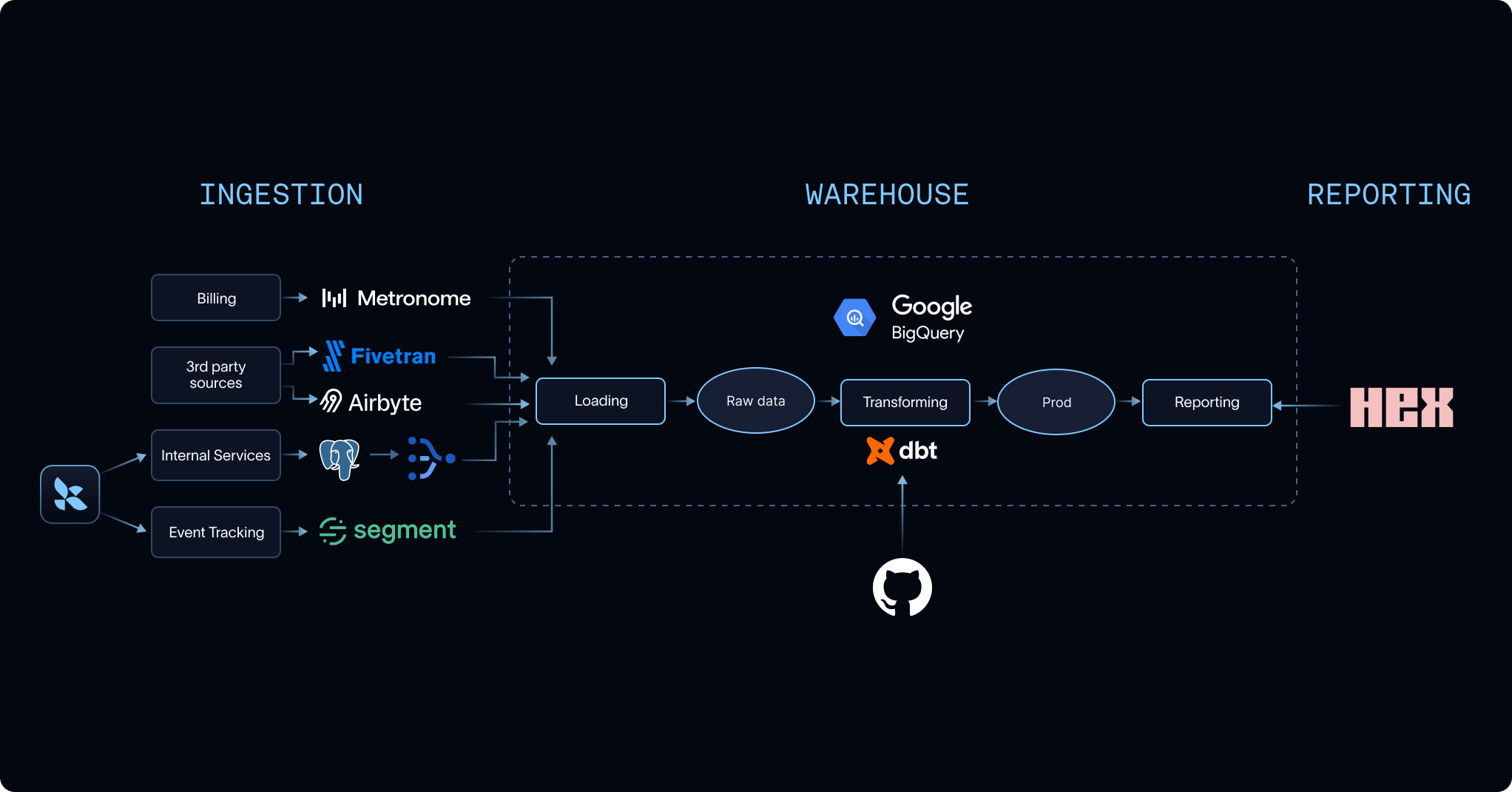
Lesson worth stealing: Cover the common questions first, then iterate. You don't need to document everything before launching. LangChain focused on the roughly 80% of questions people really ask, then read the agent's conversations to find where it was getting stuck and filled in those gaps.
The common denominator
Across these 8 case studies, one thing becomes clear: none of these teams treat analytics as a SQL generation problem. The models can already write SQL. What they can’t do on their own is know which table to trust, what “active user” means at your company, or why last month’s number was restated.
Almost every team says the same thing in its own words, which is that the hard part is context.
A few patterns show up consistently:
A clean foundation comes first: Fewer, governed datasets and a semantic layer the agent has to use before anything else. I like what LangChain said, “if the data model is confusing to humans, it will be confusing to agents too”.
Context is written down and maintained like code: Metric definitions, business logic, and domain docs live in a repo, get reviewed, and get updated when the data models change.
Simple agents beat complicated ones: OpenAI and Vercel both cut tools and prescriptive prompting, and both got more reliable results.
Evals are part of the product: Every team that reports accuracy has a set of known questions with known answers, and they rerun it whenever something changes.
Humans stay in the loop: Answers come with their sources, and anything important still gets a human sign-off.
Put together, the agent itself turns out to be the small part. Most of the work sits underneath it.
My take
Reading these case studies felt very familiar, because I went through a smaller version of this myself at Nextory, where I built the company’s first “talk-to-your-data” Slackbot from scratch.
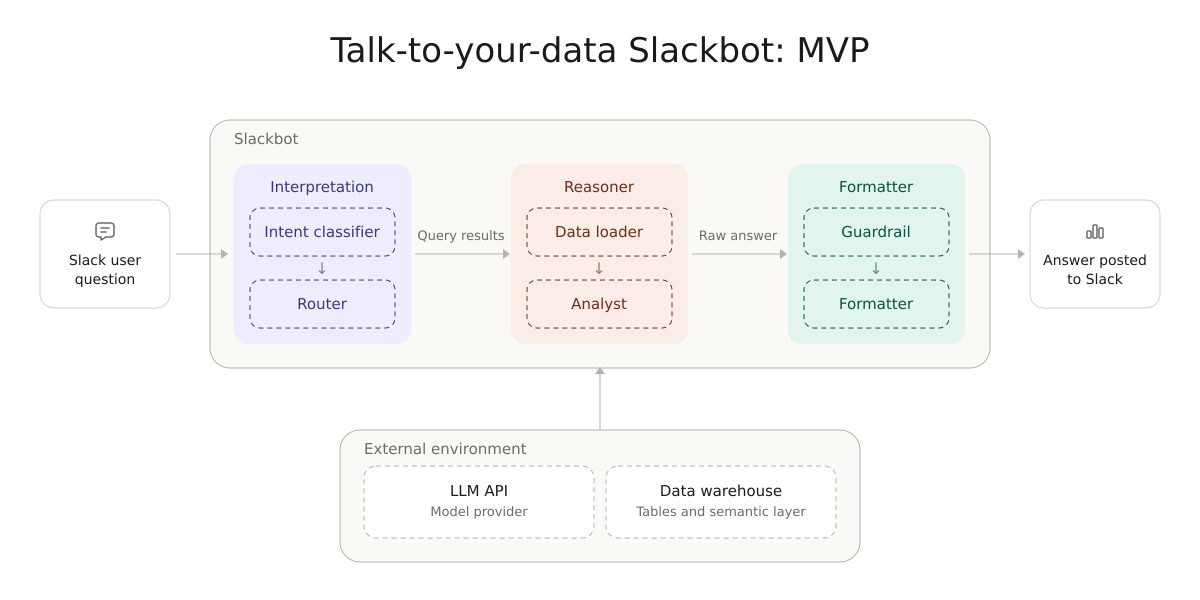
And I agree, the hardest part was not the agent itself (although it wasn’t trivial either). It was getting people to agree on what the data means and trusting the output.
So when company after company in this list says the hard part is context, I believe them. It’s also why I think it matters less than people expect whether you build-in-house or buy, because that work is the same either way.
If you want the full story, including how we made the build vs. buy decision and what it took to get people to use it, you can read my full experience here.
Dive deeper into the case studies
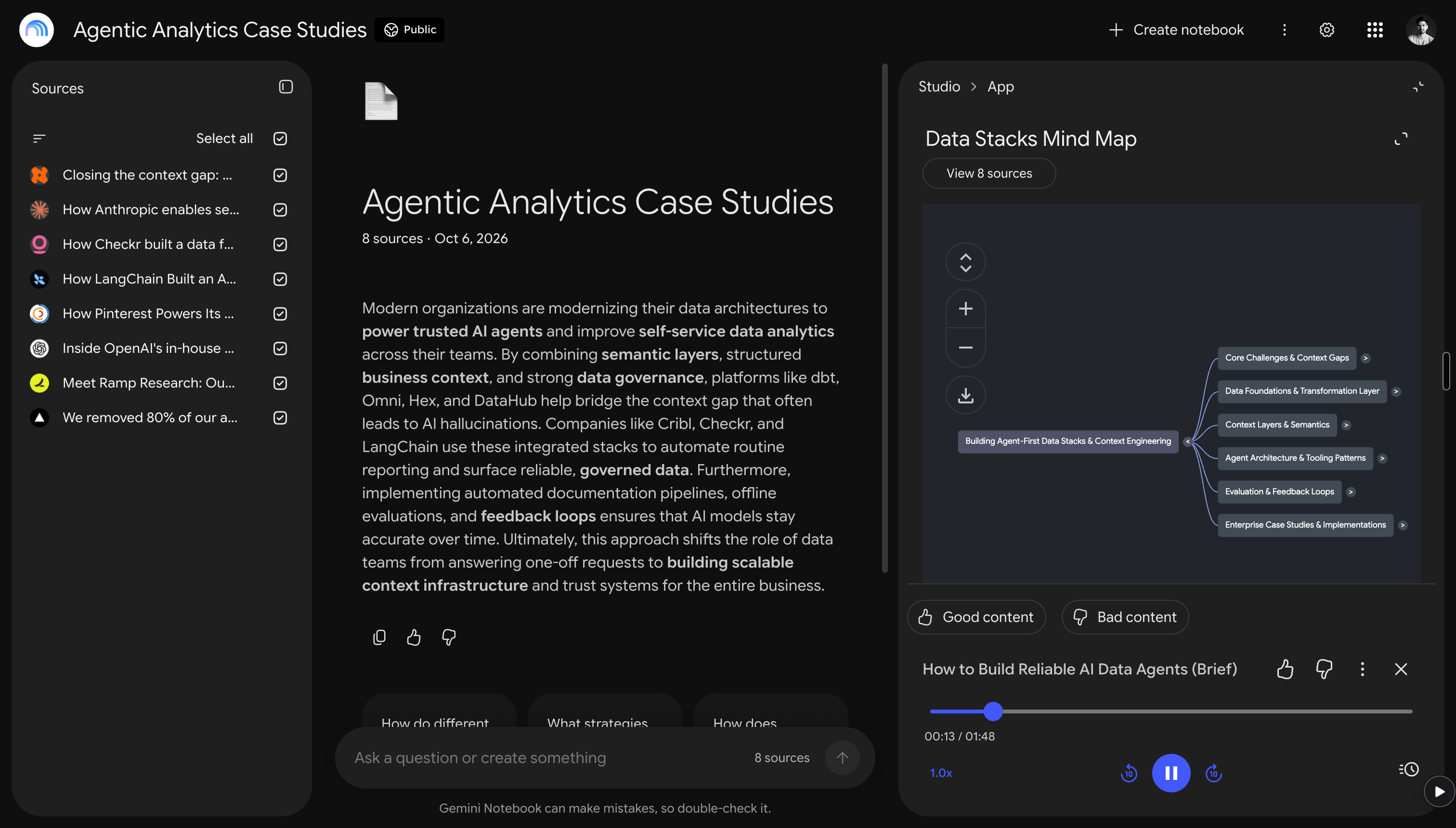
There is a lot more detail in these 8 articles than I could fit here, so I loaded all of them into a NotebookLM that you can use for free.
A couple of other great resources:
🚀 Ready to take the next step? Build real AI workflows and sharpen the skills that keep data scientists ahead.
🎥 Want to follow along on YouTube? I just launched a channel for data scientists. Don’t forget to subscribe to not miss any videos.
Thank you for reading! I hope these case studies give you a clearer picture of what AI for analytics looks like inside real companies.
- Andres Vourakis
Before you go, please hit the like ❤️ button at the bottom of this email to help support me. It truly makes a difference!